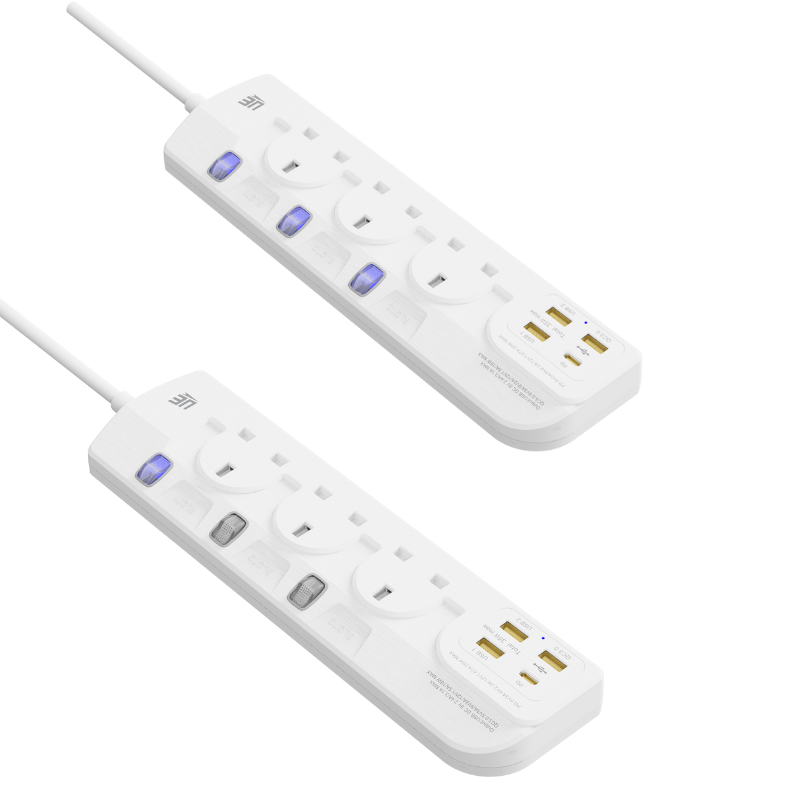
Moving a router to optimize Wi-Fi coverage often means relocating it far away from the master wall socket. You might find yourself staring at an awkwardly placed modem and wondering how to easily bridge the physical gap. Users need to know if using additional power cables will degrade network speed, cause frustrating latency, or create unforeseen hardware risks. From an electrical standpoint, a basic router acts as a low-draw device. However, hardware manufacturers and internet service providers routinely advise against using extension leads in their official troubleshooting manuals. This guide covers the critical technical distinction between extending power versus extending data lines. You will discover the exact performance implications of different electrical setups. Finally, we provide evidence-based recommendations to help you safely relocate your essential network hardware without sacrificing connectivity or stability.
Key Takeaways
Plugging a router's power adapter into a standard extension socket is generally safe and will not directly reduce your internet bandwidth or Wi-Fi range.
Extending the data line (DSL/Coaxial cable) rather than the electrical power is where signal degradation and packet loss typically occur.
Avoid plugging Powerline Network Adapters into extension sockets, as their integrated noise filters actively degrade the data signal.
Using a surge-protected extension socket adds a critical layer of defense against hardware failure during power grid fluctuations.
The Technical Distinction: Power Extensions vs. Data Extensions
You must first define the primary variable in your network setup. We need to clarify the fundamental difference between extending the router's electrical power supply and extending the broadband connection line. Many users confuse these two distinct actions. They assume any extra cable length will automatically ruin their internet speed. This assumption is technically incorrect.
Routers are inherently low-voltage devices. They typically operate between 12V and 15V. Drawing power through a copper extension lead does not throttle the router's internal processing capabilities. It also does not reduce the radio frequency (RF) output of your Wi-Fi antennas. Electrical current travels efficiently over household copper wire. As long as the voltage remains steady, the router functions perfectly. You can safely plug the power brick into an extension socket without harming local area network performance.
The real bottleneck occurs when you extend the data line. Extending the RJ11 telephone line or the coaxial cable introduces significant electrical resistance. It also invites unwanted line noise. Broadband data signals operate at high frequencies. They are highly susceptible to electromagnetic interference over long, unshielded distances. If relocation is strictly necessary, it is technically superior to use a longer Ethernet (RJ45) cable. Run this shielded Ethernet cable from the modem directly to the router. Alternatively, you can extend the electrical power itself. You should rarely extend the raw ISP input line.
Performance Evaluation Criteria
We use specific metrics to evaluate hardware relocation success. Look at the table below to understand how different cables impact your network.
Cable Type Extended
Impact on Wi-Fi Speed
Impact on Hardware
Recommendation Level
Electrical Power Lead
None
Low Risk (if surge protected)
Highly Recommended
Ethernet (RJ45) Data Line
None (up to 100 meters)
Zero Risk
Optimal / Best Practice
RJ11 / Coaxial Input Line
High Degradation & Packet Loss
Increased Modem Strain
Avoid if Possible
How a Standard Extension Socket Impacts Hardware Stability
Network devices require clean, consistent electricity. Cheap, unspooled, or daisy-chained extension cables can occasionally cause micro-drops in voltage. A micro-drop lasts only milliseconds. However, modern networking silicon reacts poorly to these sudden fluctuations. Routers are highly sensitive to voltage sags. These minor drops often manifest as random reboots or dropped IP assignments. In severe cases, they might force a router to reset to factory defaults.
You must address the necessity of surge protection. A basic standard extension socket without built-in surge protection leaves sensitive networking silicon completely vulnerable. Grid spikes happen daily. They occur when heavy home appliances cycle on and off. You should always opt for an extension board equipped with an integrated surge protector. Manufacturers measure this protection level in Joules. A higher Joule rating indicates a stronger defense against destructive electrical surges.
Thermal Considerations and Hardware Failure
Routers generate continuous heat during heavy data loads. The power adapters also become warm to the touch. Placing power adapters in overcrowded extension blocks increases hardware failure rates. Users often hide these blocks in unventilated areas, such as behind heavy furniture or inside sealed media cabinets.
Common Mistakes:
Plugging the router into a heavily loaded multi-plug block alongside space heaters or air conditioners.
Using an old, degraded extension board missing its earth grounding pin.
Best Practices:
Place your extension board in an open area to allow ambient air cooling.
Dedicate a high-quality surge protector exclusively to your networking and computing gear.
Routinely inspect the router’s power brick for heat discoloration or plastic warping.
The Exception to the Rule: Powerline Adapters
We must discuss the notable exception in home networking rules. Powerline networking uses your home’s existing electrical copper wiring to transmit data between rooms. This technology creates a direct conflict when you introduce an extension lead into the setup. Powerline modules operate by injecting high-frequency radio signals directly into the alternating current (AC) waveform.
Standard extension sockets actively destroy this specific signal. Extension boards—especially those marketed with surge protection—contain precise noise-filtering components. Engineers design these boards using metal-oxide varistors (MOVs) and internal capacitors. These components exist to clean up "dirty" electrical currents. Unfortunately, these filters interpret the high-frequency data signals generated by Powerline adapters as mere "electrical noise". The internal components actively scrub the signal from the line. This aggressive filtering causes severe bandwidth throttling. Sometimes, it results in a total network disconnection.
You must adopt a strict decision framework if your network relies on Powerline adapters. The primary Powerline adapter must go directly into the raw wall socket. You cannot compromise on this step. Most high-end Powerline units include a pass-through electrical socket on the front. The router's power adapter can safely be plugged into this pass-through socket on the Powerline unit. This configuration preserves the data signal integrity while still providing safe power to your router.
Managing Modern Hardware: The Role of the USB Extension Socket
Network hardware design is rapidly evolving. We are witnessing a massive shift in router power delivery systems. Many modern travel routers, 5G cellular hubs, and smart-home mesh nodes no longer use traditional DC barrel jacks. Instead, they rely on USB-C or high-amperage USB-A inputs. This shift changes how we plan network relocations.
Using an extension board with integrated USB ports remains a viable strategy. However, the output must match the router’s required electrical amperage. Modern 5G hubs often require 2.4A or higher to function optimally. A premium USB extension socket can handle this load seamlessly. It eliminates the need for bulky proprietary power bricks.
Evaluating Implementation Risks
You face specific risks when adopting this modern power approach. Low-quality integrated USB sockets often share total amperage across all available ports. If a board advertises a maximum 3.1A output, it divides that power dynamically. Plugging a critical mesh node into a shared USB extension socket alongside a charging smartphone presents a major problem. The smartphone will draw significant current to charge its battery. This action may severely underpower the router. An underpowered router experiences weakened radio transmission. You will immediately notice a lower Wi-Fi range and erratic ping spikes during gaming or video calls.
You should follow strict best practices for USB-powered networking gear. Rely heavily on the manufacturer's dedicated power brick. Plug this brick directly into a standard AC socket on the extension board. Avoid relying on a shared USB hub unless you can verify its dedicated per-port power delivery specs. Ensure the board explicitly supports standalone Power Delivery (PD) protocols for the specific port you assign to the router.
Decision Framework: Choosing the Right Relocation Strategy
Every home presents unique physical constraints. You must carefully evaluate your exact layout before moving hardware. We developed this straightforward decision framework to guide your relocation process. It helps you maximize Wi-Fi coverage while preserving hardware integrity.
Scenario A: Minor Relocation (1 to 3 meters)
Sometimes you only need to move the router out from behind a thick television stand. A short move often places the antennas in a better line of sight.
Action: Use a high-quality, surge-protected standard extension socket.
Execution: Plug the router's original power brick into the extension. Ensure the extension lead runs safely along the baseboards. Keep the original ISP master socket data cable as short as possible. Do not coil excess broadband cabling.
Scenario B: Major Relocation (Moving to another room)
You may need to push Wi-Fi into an entirely different wing of the house. Moving the primary router is tempting, but executing it poorly ruins speeds.
Action: Do not use 15-meter extension power cords. You invite dangerous voltage drops.
Execution: Leave the broadband modem plugged in exactly at the master wall socket. Run a long, shielded Cat6 Ethernet cable from the modem to the new router location. You can then power the router locally in the new room using a standard wall plug.
Scenario C: Expanding Coverage Without Moving the Primary Router
If running long cables sounds terrible, you should consider upgrading your entire topology. You do not always need to physically relocate the main box.
Action: Evaluate a dedicated Mesh Wi-Fi system.
Execution: A mesh system solves the coverage problem at the hardware level. You place satellite nodes in distant rooms. This method eliminates messy cable management. It also removes the need to rely on questionable, lengthy extension leads running across hallways.
Relocation Goal
Recommended Hardware
Primary Caution
Slight adjustment (under 3m)
Surge-protected multi-plug
Avoid daisy-chaining power blocks.
Different room entirely
Cat6 Ethernet Cable
Do not stretch the ISP phone line.
Whole-home dead zone fix
Mesh Wi-Fi Network Nodes
Ensure nodes have overlapping signals.
Conclusion
We can confidently summarize the final verdict on router power delivery. Yes, you can safely power your router via an extension lead without sacrificing your internet speed. You simply need to ensure the extension is high-quality and heavily surge-protected. Clean electricity guarantees stable network processing.
You must remember the golden rule of network deployment. Always extend the network via Ethernet cables or well-made power cables. Never extend your coverage by stretching the vulnerable broadband input line. Extending raw DSL or coaxial cables introduces severe noise and latency.
Next Step 1: Check your router's hardware specs for exact voltage and amperage requirements.
Next Step 2: Upgrade your current generic multi-plug to a dedicated, Joule-rated surge protector.
Next Step 3: Map out your room to minimize cable stretching and maximize ambient air cooling around the power adapter.
FAQ
Q: Will an extension socket slow down my Wi-Fi speed?
A: No. Electrical power delivery does not dictate radio frequency performance. Standard power leads do not interfere with internal processing. If your Wi-Fi is significantly slower after moving the router, it is strictly due to the new physical location. Factors like thicker walls, distance, or appliance interference cause the drop, not the power extension itself.
Q: Why did my ISP tell me to plug the router directly into the wall?
A: ISPs mandate this during troubleshooting to eliminate the extension lead as a potential point of failure. A faulty or aging extension socket can cause intermittent micro-power loss. This mimics a true broadband network drop. Connecting to the wall is an isolation diagnostic standard, not a strict operational necessity for daily use.
Q: Can I use a daisy-chained extension lead for my router?
A: No. Daisy-chaining—plugging one extension cord into another—violates fundamental electrical safety codes. It dramatically increases line resistance and elevates the risk of severe power fluctuations. These unpredictable voltage sags can permanently brick your router's firmware or cause sudden hardware failure.
UE Electronic is a power supplier integrating R&D, production and sales. We maintain a leading level in extension cord and GaN charger.We are committed to becoming a global power supplier.