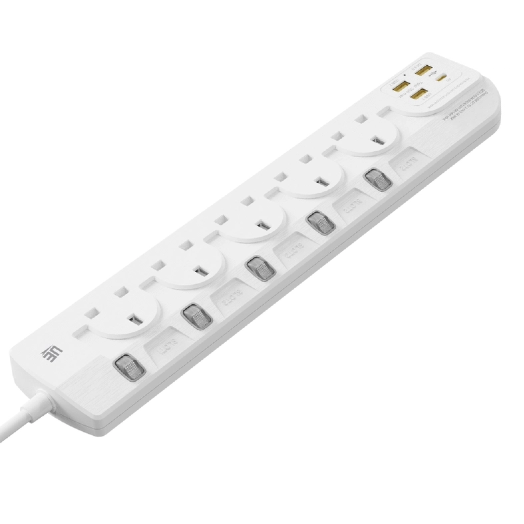
Extension sockets are indispensable tools that help connect multiple devices to a single power outlet. Whether at home, in the office, or at workstations, extension sockets are widely used to manage the increasing number of electronic devices we rely on daily. However, like any electrical equipment, extension sockets can experience issues that may affect their performance and safety. In this article, we will discuss the most common problems associated with extension sockets, their causes, and how to resolve them efficiently. UE Electronic offers high-quality, durable extension sockets designed to provide a safe and reliable power supply to meet your needs.
Problem 1 – Overheating or Tripping
One of the most common problems with extension sockets is overheating or tripping. Overheating occurs when the socket is overloaded, which can lead to excessive heat generation and may even cause a fire. Extension sockets are designed to handle a certain amount of electrical load, and exceeding this load can cause the socket to overheat. The overload occurs when too many devices are plugged into the socket, or when high-power appliances like space heaters or air conditioners are connected to an underpowered socket.
Why It Happens
The root cause of overheating is usually due to overloading. Every extension socket has a power rating, and if the total power consumed by the devices connected exceeds the socket’s capacity, it leads to overheating. Overloading places strain on the internal components of the socket, causing them to heat up. In addition, poor-quality sockets may have wiring that is not insulated well enough to handle high loads, exacerbating the problem.
Misuse, such as plugging in devices that consume more power than the socket is rated for, can also cause overheating. Additionally, leaving the socket plugged in for long periods without monitoring the load is another common issue.
Problem 2 – Loose Connections or Sparks
Loose connections or sparks are another problem that can occur with extension sockets. These issues typically arise when the internal components of the socket, such as the electrical contacts, become worn out or loose over time. This can cause arcing, which results in sparks when power is applied.
Causes and What It Indicates
Loose connections may occur due to wear and tear, improper handling, or frequent plugging and unplugging of devices. Over time, the internal parts may become loose or corroded, causing electrical resistance and resulting in the formation of sparks. Sparking can be dangerous, as it may lead to electrical fires or damage to connected devices.
Safety Action Steps
If you notice sparks or loose connections, it is essential to stop using the extension socket immediately. Disconnect all devices and inspect the socket for signs of wear or damage. If the socket shows signs of loose connections or sparking, it should be replaced as soon as possible. UE Electronic extension sockets are built to last, with robust internal components that minimize the risk of sparking and other issues.
Problem 3 – USB Ports Not Working
In modern extension sockets, USB ports are becoming an increasingly common feature, as they allow users to charge devices like smartphones, tablets, and laptops directly from the socket. However, sometimes users encounter issues where the USB ports do not work as expected.
USB-A vs USB-C Issues
One of the common issues with USB ports in extension sockets is compatibility. Many extension sockets include USB-A and USB-C ports, but not all devices support both types. USB-A and USB-C have different power delivery specifications, which can lead to charging issues if the socket and device are not compatible. For instance, certain older devices may not be compatible with USB-C ports, or they may not charge as quickly as they would with a dedicated charger.
Another issue may arise with power delivery. USB-C ports typically support faster charging speeds compared to USB-A, and if the extension socket doesn’t support the required voltage or current for rapid charging, the device may charge very slowly or not at all.
Possible Device Compatibility Tips
To resolve USB charging issues, check the device’s charging requirements and ensure that the extension socket you are using is compatible with those requirements. For example, if you have a device that supports USB-C fast charging, make sure the extension socket supports the USB-C power delivery protocol. Additionally, always use quality cables, as poor-quality cables can lead to charging problems.

Problem 4 – Devices Not Powering On
Sometimes, after plugging in a device into an extension socket, the device doesn’t turn on or seems to have no power. This problem is usually due to issues with the power supply, the extension socket, or the device itself.
Fault Diagnosis Flow
If your device isn’t turning on, the first step is to check the extension socket. Ensure that the socket is turned on and that the power is flowing through it. Next, check the circuit breaker or fuse in the extension socket. Some extension sockets are equipped with built-in fuses that cut off the power in the event of an overload, and these may need to be reset or replaced.
Next, verify if the outlet itself is working properly. Plug another device into the same extension socket to see if it gets power. If the second device works, the problem may lie with the first device.
Lastly, check the cable. A damaged or frayed cable could be preventing power from reaching the device. If all else fails, test the device itself to see if it is malfunctioning.
Troubleshooting Table
To simplify the troubleshooting process, here’s a table outlining common extension socket issues, their likely causes, and the solutions to fix them.
Problem | Likely Cause | Solution |
Overheating | Excess load | Reduce load, check rating |
No power | Wiring issue | Test outlet, reset switch |
Sparks | Loose plug | Replace socket |
USB issue | Device/port mismatch | Try other port |
When You Should Stop Using an Extension Socket
In some cases, it is necessary to stop using an extension socket altogether, especially if it is no longer functioning properly or if it poses a safety risk. Here are some signs that you should stop using an extension socket:
Safety Cut-Offs
If you notice signs of damage, such as overheating, sparks, or a burning smell, you should immediately stop using the extension socket. Continuing to use a damaged socket can lead to severe electrical hazards, including fires and shocks.
Replace vs Repair Checklist
It is generally not advisable to repair an extension socket, especially if it is damaged beyond normal wear and tear. Always replace a faulty extension socket rather than attempting to repair it. If you see any of the following issues, replace the socket:
Visible damage to the power cord or plug
Frequent overheating or tripping
Sparking or arcing inside the socket
A burning smell or melted parts
Conclusion
Prevention is always better than cure when it comes to extension sockets. To ensure the longevity and safety of your extension socket, always choose high-quality products from reputable brands like UE Electronic. Regularly inspect your sockets for signs of wear and tear, and avoid overloading them by following the manufacturer’s instructions. By taking these simple steps, you can prevent most common issues and enjoy the benefits of a safe and reliable power supply.
For more information about UE Electronic’s extension sockets and how they can help you power your devices safely and efficiently, please feel free to contact us today!
FAQ
1. What causes an extension socket to overheat?
Overheating occurs when the devices plugged into the extension socket exceed its maximum load capacity. This puts stress on the socket, causing it to heat up and potentially leading to a fire.
2. How can I prevent sparks from my extension socket?
Sparks often occur due to loose connections or worn-out internal components. If you notice sparks, stop using the socket and replace it immediately.
3. Why aren’t the USB ports on my extension socket working?
The issue may be due to compatibility between your device and the USB port. Ensure that the socket supports the charging standards required for your device, and check that the cable is of good quality.
4. What should I do if my device isn’t powering on through the extension socket?
Check the socket, the circuit breaker, the outlet, and the cable. If necessary, test the device to see if it is malfunctioning or requires repair.