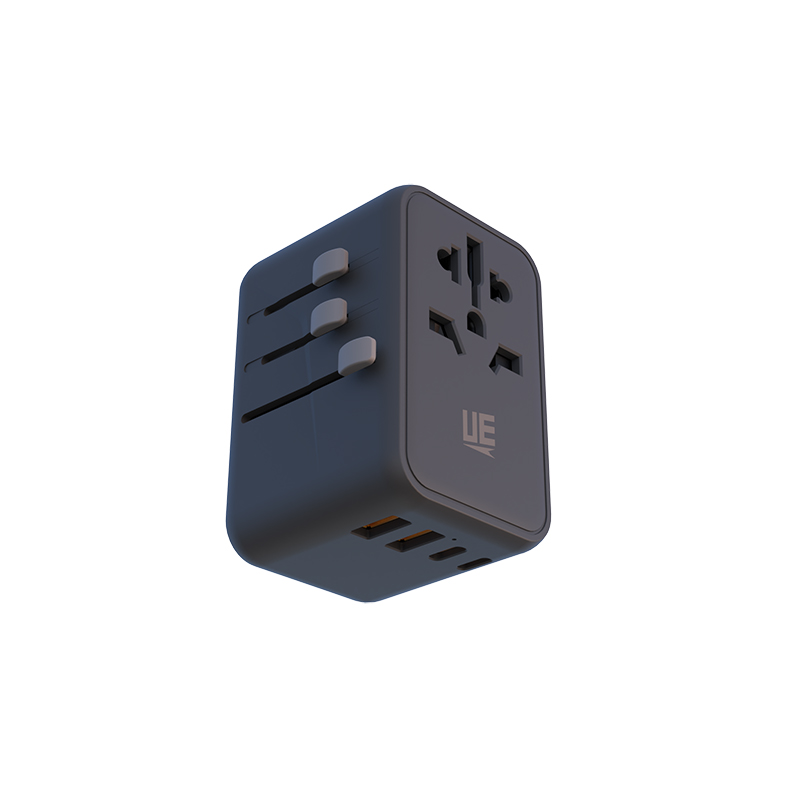
Picture landing in a new time zone just hours before a critical boardroom meeting. Your laptop battery is completely depleted, and panic sets in quickly. You realize standard wall plugs simply cannot handle modern multi-device charging. This represents a frequent nightmare for global professionals. You need a reliable travel adapter for business travel to maintain peak productivity.
Consumer-grade tourist adapters might charge a simple phone overnight. However, they fail miserably under professional demands. Business travelers require high efficiency, absolute device safety, and compact form factors. You must power laptops, tablets, and smartphones simultaneously. You cannot afford to risk expensive hardware damage in foreign hotels. Airport lounges also present unique charging challenges.
In this article, we introduce a complete evaluation framework for your next trip. You will learn how to analyze wattage, check safety compliances, and choose the perfect form factor. We will help you mitigate hardware risks effectively. Ultimately, our guidelines will help you eliminate charger anxiety forever.
Key Takeaways
A reliable business travel adapter prioritizes total wattage output (minimum 65W for laptop support) over simple plug compatibility.
Transitioning to a unified USB-C travel adapter eliminates the need to carry multiple native charging bricks.
Universal models offer convenience, but region-specific grounded adapters may be necessary for high-draw devices or strict corporate hardware compliance.
Voltage conversion is distinct from plug adaptation; most modern business tech is dual-voltage, requiring only a mechanical adapter, but surge protection remains non-negotiable.
The Business Travel Power Dilemma: Evaluating Total Device Load
Modern executives carry a heavy digital payload across international borders. You likely travel with a 14-inch corporate laptop, a flagship smartphone, noise-canceling headphones, and a smart watch. Each device demands specific, distinct power inputs. When you combine these requirements, the total electrical load becomes substantial. You can no longer rely on weak, single-port wall plugs found in older hotel rooms.
Legacy charging solutions create immense inefficiency for frequent flyers. Carrying multiple original equipment manufacturer (OEM) charging bricks adds unnecessary bulk. You also have to pack cheap plug adapters for different regions. They add heavy weight to your carry-on luggage. These loose components tangle easily in your bag. They waste valuable packing space and slow you down during airport security checks.
Defining success requires a highly minimalist approach. A successful setup replaces three or four separate chargers entirely. You consolidate them into a single, high-efficiency hub. This hub adapts mechanically to global wall outlets. It distributes power intelligently across all connected electronics. You gain convenience, save space, and keep your devices fully charged for your meetings. You also reduce the chance of leaving an essential charger behind in a hotel room.
Core Evaluation Criteria: What Makes a 65W Multiple Plugs Travel Adapter Essential
Understanding wattage distribution is critical before making a purchase. Power allocation follows specific software rules inside multi-port hubs. A 65W multiple plugs travel adapter delivers a full 65 watts to a single device when used alone. However, it dynamically splits that output when you engage two ports simultaneously. It might deliver 45W to your laptop and 20W to your phone.
We establish 65W as the absolute baseline for professionals. It allows you to charge a standard business laptop efficiently. You can also trickle-charge a secondary device at the same time. If you buy a weaker unit, your laptop battery will drain faster than it charges during intense work sessions.
Port configuration represents another major industry shift. You must prioritize modern standards. You need a dedicated USB-C travel adapter for today's hardware. We strongly recommend configurations featuring at least two USB-C Power Delivery (PD) ports. You should also look for one legacy USB-A port. This ensures you can still power older peripherals, like presentation clickers or wireless mice, seamlessly.
Gallium Nitride (GaN) technology makes this compact power possible. GaN is virtually mandatory for modern business travelers. Older silicon chargers are bulky and trap heat. GaN allows manufacturers to fit high-wattage components into a very small space. The material is highly heat-resistant. It significantly reduces thermal throttling during overnight multi-device charging. You get safer, faster, and cooler power delivery in a pocket-sized form factor.
Universal vs. Region-Specific: Shortlisting Your Multi-Country Power Adapter
You face a primary choice regarding the physical form factor. Should you buy an all-in-one block or modular pieces? Each style serves a different travel cadence.
The all-in-one universal travel adapter provides immense geographical flexibility. It usually covers over 150 countries using retractable internal sliders. You can easily switch between US, EU, UK, and AUS prongs using side buttons. This design is ideal for multi-leg global itineraries. Imagine flying from New York to London and then to Dubai in one week. You only need to pack one accessory.
However, this flexibility introduces specific mechanical risks. These units are often quite bulky and heavy. Mechanical sliders can jam or fail over time due to dust. Heavier units frequently sag or fall out of loose hotel and airport wall sockets. Deeply recessed EU sockets are notoriously difficult for bulky universal blocks to grip.
Modular or region-specific adapters offer a compelling alternative. They provide a lighter, much more secure fit in the wall. This is especially true for heavy Type G UK plugs or recessed Type C/E/F EU plugs. Point-to-point business travelers love modular options. If you frequently visit the same regional offices, they remain highly reliable. They snap securely into the wall and rarely fall out of loose sockets.
Travel Adapter Form Factor Decision Matrix
Adapter Style
Key Advantages
Potential Drawbacks
Ideal Traveler Profile
All-in-One Universal
Maximum global compatibility; eliminates regional planning.
Heavier weight; mechanical sliders can fail; prone to wall sagging.
Multi-leg global flyers hitting diverse regions in one trip.
Modular / Region-Specific
Lighter carry weight; highly secure and stable wall connection.
Requires swapping manual parts; limited to specific geographic zones.
When selecting your next multi-country power adapter, evaluate your standard travel habits carefully. Match the form factor to your actual flight patterns.
Hardware Security, Safety, and Compliance Considerations
Protecting expensive corporate hardware is non-negotiable. Foreign power grids often fluctuate wildly in older cities. You must understand how your adapter handles unexpected electrical stress. You cannot trust your data to an unprotected plug.
Surge protection and fuse systems form your first line of defense. Hotel grids are notoriously unreliable during peak hours. A sudden voltage spike can instantly destroy a high-end laptop motherboard. You must verify the presence of auto-resetting fuses. If the adapter uses physical ceramic fuses, ensure it includes accessible spare fuses in a side compartment. These mechanical mechanisms sacrifice themselves to protect your electronics during unexpected power surges.
Grounding, or earthing, presents another critical reality. We must address a very common industry misconception. Most universal blocks on the market are strictly un-grounded two-prong models. They do not carry an earth connection to the wall. Many modern laptops feature premium metal chassis designs. When you plug them into un-grounded sockets, you might feel localized static shocks while typing. A grounded three-prong pass-through adapter prevents this issue entirely. It routes rogue electricity safely into the earth. It also meets stricter corporate IT hardware safety guidelines.
Finally, regulatory certifications matter deeply for personal safety. Do not compromise on standard trust signals. Look for explicit CE, FCC, and RoHS markings printed directly on the device. These acronyms indicate rigorous laboratory safety testing. We strongly caution against buying cheap white-label imports from unknown brands. They frequently over-promise on wattage output while drastically under-delivering on thermal safety. Poorly manufactured adapters overheat easily, melting internal plastics and posing serious fire hazards.
Shortlisting Logic & Implementation Next Steps
Choosing the right power hub requires a systematic approach. Do not guess your power requirements. Follow these specific steps to optimize your business travel everyday carry setup.
Implementation Workflow
Step 1: Audit Device Load. Start by checking the bottom of your heaviest device. This is usually your primary corporate laptop. Look for the fine print indicating maximum input wattage required. If your laptop needs 65W to run heavy software, your hub must output at least 65W from a single port. Check your tablet and phone requirements as well.
Step 2: Consolidate Cables. You must pair the chosen adapter with high-quality cables. Buy e-marked 100W USB-C cables. These cables contain a tiny chip. The chip tells the charger it is safe to push high current. A premium power hub is completely useless if you use a sub-standard cable. Weak cables bottleneck power and trigger slow-charging warnings on your screen.
Step 3: Test Before Deployment. Never take untested gear on an international trip. We highly recommend stress-testing the adapter domestically first. Plug in all your devices at zero battery. Let them charge simultaneously for an hour. Verify the thermal stability by feeling the adapter block. Ensure the power-splitting behavior works exactly as expected without dropping the connection.
Following these clear steps guarantees you will not face unexpected failures abroad. You can trust your equipment entirely. You will land ready to work.
Conclusion
Selecting the perfect travel hub requires more than quick accessory shopping. It serves as a vital exercise in risk management and workflow optimization. You protect your data by protecting your hardware.
Evaluate your actual wattage needs before purchasing any new charging equipment.
Prioritize device safety by insisting on auto-resetting fuses and proper grounding options.
Eliminate unnecessary carry-on bulk by transitioning to a unified, multi-port USB-C solution.
Test your complete setup domestically to verify power distribution rules.
We strongly advise investing in a high-quality, GaN-powered, 65W+ multi-port unit today. Make it the foundational piece of your modern everyday carry. Audit your current electronics load this week. Upgrade your cables to e-marked 100W standards. Streamline your next international deployment and leave legacy bricks behind.
FAQ
Q: Do I need a voltage converter or just a travel adapter for my laptop and phone?
A: You likely only need a basic mechanical adapter. Most modern business electronics, including laptops and phones, are dual-voltage. Check the text label on your charger. If it reads "AC 100-240V," it automatically handles global voltage differences. Voltage converters are only necessary for single-voltage items like older hair dryers or specialized medical equipment.
Q: Why does my laptop say "slow charger connected" when using a multi-country power adapter?
A: This happens due to intelligent wattage-splitting. When you plug multiple cables into a multi-port hub, the internal chip redistributes the total power. It draws power away from the main laptop port to feed your secondary devices. To fix this, unplug the other devices, or upgrade to an adapter with a much higher total power ceiling.
Q: Can I use a high-wattage travel adapter on airplane AC outlets?
A: You should exercise caution on airplanes. In-flight seat power is often strictly capped at 75W to 100W total per row. If you plug in a high-draw adapter and connect multiple depleted devices, you might trip the seat's internal circuit breaker. It is best to charge only one device at a time while flying.
Q: Are all-in-one universal adapters safe for long-term use in temporary corporate housing?
A: They are safe for temporary use, but they handle thermal loads differently over extended periods. Keeping an all-in-one block plugged in for eight plus hours daily can strain its mechanical sliders. For semi-permanent desk setups, modular region-specific plugs offer superior structural stability and better long-term heat dissipation against the wall.
UE Electronic is a power supplier integrating R&D, production and sales. We maintain a leading level in extension cord and GaN charger.We are committed to becoming a global power supplier.