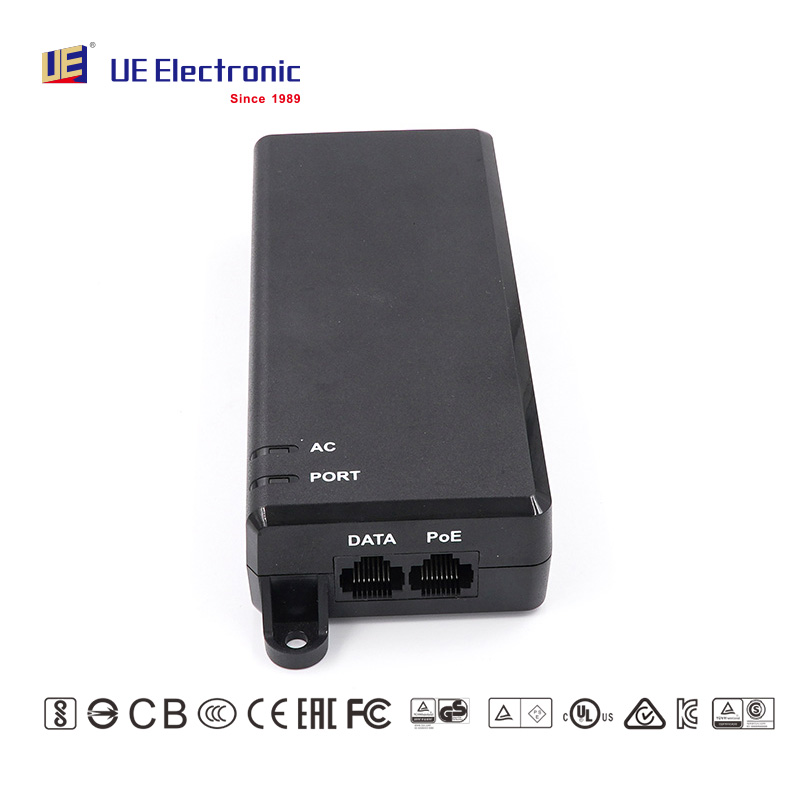
Expanding an existing network using modern edge devices often forces a difficult administrative choice. You might replace perfectly functional, non-PoE network switches, or you must find a highly targeted power delivery solution. Ripping and replacing core infrastructure creates unnecessary disruptions for users and impacts organizational budgets heavily.
Power over Ethernet (PoE) injectors act as a strategic bridge in these exact scenarios. They allow network administrators and installers to add power to a standard data cable mid-span effortlessly. This approach saves time, preserves your current hardware investments, and accelerates deployment schedules. You simply plug the injector into a nearby outlet and connect your data cables.
For high-value endpoints like IP security cameras and wireless access points, selecting the right injector means much more than just supplying basic power. It requires matching specific IEEE standards, verifying bandwidth capacities, and ensuring strict safety protocols. Read on to discover how to properly match equipment, maximize device longevity, and guarantee optimal network uptime across your facilities.
Key Takeaways
Standardization is Non-Negotiable: Relying on an IEEE 802.3af PoE injector (or 802.3at/bt) ensures proper power handshakes, protecting sensitive edge devices from voltage overloads.
Application Dictates Wattage: Static IP cameras and basic access points usually require 15.4W (af), while PTZ (Pan-Tilt-Zoom) cameras and Wi-Fi 6 access points demand 30W to 60W+ (at/bt).
Scale Determines Viability: Injectors are highly cost-effective for deploying 1 to 3 devices; beyond this, upgrading to a dedicated PoE switch is generally more scalable and manageable.
Speed Matters: Supplying power without matching network speed (e.g., using a 10/100Mbps injector for a Gigabit Wi-Fi AP) will severely bottleneck performance.
The Business Case: Why Use a PoE Injector Instead of a PoE Switch?
Problem Framing
Upgrading core network infrastructure strictly to power a handful of remote devices is often cost-prohibitive. It also introduces unnecessary network downtime during the swap. Swapping out a fully operational 48-port enterprise switch just to accommodate two new exterior cameras rarely makes practical sense. Network administrators face immense pressure to keep systems online. Scheduling a maintenance window to replace a core switch impacts entire departments. You risk breaking existing VLAN configurations and routing protocols just to provide power to a minor edge device. This imbalance between effort and reward drives the need for alternative power solutions.
Cost-Effective Edge Expansion
Deploying a targeted injector allows organizations to leverage their existing non-PoE switches efficiently. You add power capabilities exactly where needed without touching the central rack setup. This keeps capital expenditures low while scaling edge capabilities quickly. For example, a retail store needing one ceiling-mounted Wi-Fi access point can purchase a single inexpensive device. You avoid buying a premium PoE-enabled switch. This surgical approach to network design gives IT teams incredible flexibility. You allocate budgets toward better end devices rather than redundant switching hardware.
Decentralized Troubleshooting
Injectors isolate power faults exceptionally well. If a massive power surge hits an outdoor pole-mounted camera, a $30 injector might fail first. This localized failure protects your $1,000 core network switch from catastrophic electrical damage. Decentralized power creates a vital physical buffer between exterior environmental hazards and interior data centers. When an injector fails, a junior technician can simply swap it out in minutes. Diagnosing a burnt-out port on a central switch requires far more time, expertise, and operational disruption.
The Break-Even Point
There is a distinct physical limitation you must acknowledge. Injectors add significant cable clutter and occupy limited wall outlets. Once a deployment exceeds three or four devices in a single telecom closet, the spatial logic shifts dramatically. At this threshold, mounting multiple bulky plastic blocks becomes messy and difficult to manage. Upgrading to a multi-port PoE switch becomes more scalable and organized. Understanding this break-even point helps you transition from mid-span injection to centralized power seamlessly.
Sizing a PoE Injector for IP Camera Deployments
Power Budgeting for Surveillance
You must analyze the actual power draw before purchasing any equipment. Choosing the right PoE injector for IP camera installations requires reading the technical specification sheets closely. Static dome or bullet cameras generally run well under 15W, making them easy to power. Advanced PTZ (Pan-Tilt-Zoom) cameras perform heavy mechanical movements constantly. They often feature internal heaters to prevent lens fogging or powerful IR arrays for night vision. These advanced surveillance tools demand PoE+ (30W) or PoE++ (60W/90W) standards. Underpowering a camera causes erratic behavior, missing footage, and unexpected reboots during crucial security events.
The Case for the Active PoE Injector
Modern endpoint devices require a precise handshake protocol to function safely. An active PoE injector verifies the end device's specific power requirements before sending any electrical voltage down the line. This intelligent negotiation prevents dangerous electrical overloads and equipment fires. Conversely, "Passive PoE" delivers always-on voltage regardless of device readiness. This outdated method can permanently damage standard IP cameras if you misconfigure the connections. Network engineers universally recommend active injectors to ensure maximum safety and hardware compatibility across diverse vendor ecosystems.
Outdoor Camera Considerations
Exterior mounting introduces severe environmental hazards you cannot ignore. You must evaluate injectors featuring industrial temperature ratings when planning outdoor deployments. Standard indoor models melt or freeze when exposed to extreme climates. Integrated surge and lightning protection are absolutely essential for cameras mounted on exterior brick walls or metal parking lot poles. These safeguards prevent sudden weather events from traveling back down the copper line into your main network rack. Investing in hardened industrial equipment prevents catastrophic cascade failures during summer thunderstorms or winter blizzards.
Selecting a PoE Adapter for Wireless APs
Bandwidth Compatibility (Gigabit vs. Fast Ethernet)
A standard PoE adapter for wireless AP deployments must match network data throughput perfectly. Deploying a legacy Fast Ethernet (10/100) injector on a brand new Wi-Fi 6 access point creates severe bandwidth bottlenecks instantly. The wireless access point might turn on, but user speeds will crawl. Fast wireless speeds require Gigabit or Multi-Gigabit (2.5G/5G) rated injectors to handle heavy traffic loads seamlessly. Overlooking port speeds remains one of the most common mistakes inexperienced installers make when upgrading corporate wireless networks.
Matching the Wi-Fi Access Point Power Supply to IEEE Standards
Establish the correct baseline for your wireless equipment to ensure stability. The baseline IEEE 802.3af PoE injector provides up to 15.4W of raw power. This output easily supports older legacy devices or low-density APs found in small offices. However, you must anticipate future wireless density requirements. Modern multi-radio, high-density enterprise APs increasingly require 802.3at (PoE+) or higher. This increased wattage activates all internal antennas, dedicated security scanning radios, and Bluetooth beacons. A properly rated Wi-Fi access point power supply ensures uninterrupted coverage and maximum client capacity.
Form Factor and Mounting
Evaluate physical mounting options carefully before finalizing your procurement list. Wall-mountable injectors work perfectly for isolated placements hidden above acoustic drop ceilings or mounted discreetly under office desks. Rack-mountable midspan hubs offer significantly cleaner cable management when deploying multiple wireless APs across a single corporate floor. Loose injectors dangling from patch panels look unprofessional and invite accidental disconnections. Securing the physical device properly reduces human error and keeps the server room environment highly organized and easy to audit.
Implementation Risks and Installation Realities
The 100-Meter Strict Rule
Installers must respect basic ethernet physics during every deployment. PoE injectors do not extend the standard 100m (328ft) Ethernet distance limit for data transmission. The injector merely adds power to the existing data run; it does not amplify the data signal itself. Pushing cables beyond this physical limit results in extreme packet loss, erratic camera feeds, and dropped wireless connections. If distance limits pose an issue for a remote guard shack or a distant warehouse corner, you must use dedicated PoE extenders as a completely separate technological solution.
Voltage Drop & Cable Quality
Cable material significantly impacts long-term network performance and stability. Using cheap CCA (Copper-Clad Aluminum) cables leads to rapid voltage drop over long distances. You should only use pure solid copper Cat5e, Cat6, or Cat6a cabling for power delivery. Poor cabling causes security cameras to reboot constantly during peak power draws. This often happens precisely when IR night vision activates at dusk. The sudden spike in power demand exceeds the cheap cable's delivery capacity, causing the device to fail precisely when you need surveillance most.
Thermal Management
Consider the physical reality of stacked networking equipment. Using multiple injectors closely grouped in a poorly ventilated network rack causes severe heat accumulation. Injectors generate latent heat during the AC-to-DC conversion process. This thermal stress degrades internal power capacitors over time. Unmanaged heat eventually leads to premature injector failure. Always space power adapters properly, use zip ties to keep ventilation ports clear, and ensure your telecom closet has adequate active cooling to handle the additional thermal load.
Shortlisting Logic: Making the Final Buying Decision
Selecting the exact right model requires a systematic approach. Follow this methodology to prevent purchasing incompatible equipment that delays your installation timeline.
Step 1: Check the End-Device Spec Sheet
Always identify the required IEEE standard (af/at/bt) first. Locate the specific wattage maximum printed on the device label or in the manufacturer's PDF documentation. Never guess power requirements. Supplying 15W to a device requiring 30W will result in endless boot loops.
Step 2: Confirm Port Speeds
Ensure the chosen injector fully supports Gigabit data rates at a minimum. Newer Wi-Fi 6 and Wi-Fi 7 APs often require Multi-Gigabit (2.5G, 5G, or 10G) port speeds to prevent frustrating data throttling. Check the data-in and data-out port specifications clearly.
Step 3: Verify the Environment
Decide between standard commercial models or hardened industrial versions. Placement dictates this critical choice. A climate-controlled server room operates differently than a sealed outdoor NEMA enclosure. Standard commercial models handle 0°C to 40°C easily. Industrial injectors easily survive harsh swings from -40°C to 75°C.
Next Step Action
Build a precise bill of materials (BOM) before spending any budget. Match network cables, injectors, and end devices in a strict 1:1 ratio before generating purchase orders. This ensures installers have everything needed on day one.
PoE Standard Comparison for Edge Devices
IEEE Standard
Max Power Delivery (Port)
Typical IP Camera Use
Typical Wi-Fi AP Use
802.3af (PoE)
15.4W
Static indoor domes, basic bullets
Legacy APs, single-band routers
802.3at (PoE+)
30W
PTZ cameras, outdoor heated cameras
Wi-Fi 5 / Wi-Fi 6 dual-band APs
802.3bt (PoE++)
60W / 90W
Multi-sensor arrays, heavy motorized PTZ
Wi-Fi 6E / Wi-Fi 7 high-density APs
To streamline your final selection, keep these practical rules in mind:
Audit your current switch capacities to ensure you actually lack available PoE ports.
Calculate precise power budgets per endpoint to avoid underpowering critical security devices.
Verify cable quality (solid copper vs. CCA) before beginning any physical installation.
Order extra injector units as cold spares to minimize downtime during sudden hardware failures.
Conclusion
PoE injectors provide a surgical, highly effective method to power isolated equipment seamlessly. They support both IP cameras and Wi-Fi access points flawlessly in diverse environments. You achieve robust network expansion without completely overhauling your existing non-PoE network architecture. This targeted approach saves capital, reduces maintenance windows, and keeps essential operations running smoothly.
Always prioritize active, IEEE-compliant injectors for every deployment. Avoid proprietary or passive models whenever possible. Adhering to strict IEEE standards ensures end-device safety, prevents electrical fires, and maximizes long-term network reliability. Take the time to match data speeds and power budgets correctly, and your edge network will perform flawlessly for years to come.
FAQ
Q: Will an active PoE injector fry my non-PoE devices?
A: No. Active injectors use standard IEEE negotiation protocols. If you accidentally connect one to a non-PoE device, like a standard desktop computer or smart TV, the injector detects the lack of PoE capability. It will only pass data through the line, sending absolutely no power, keeping your non-PoE devices completely safe.
Q: Can I plug a PoE injector directly into a router?
A: Yes, you can. The injector simply sits mid-span between your router (or network switch) and the endpoint device. You run a standard ethernet cable from the router to the "Data In" port, and another cable from the "Data & Power Out" port directly to your camera or access point.
Q: Where is the best place to physically install the injector?
A: Injectors are typically installed inside telecom closets or near the central network switch where standard AC wall power is easily accessible. However, you can technically place them anywhere along the cable run, provided the total distance from the switch to the end device remains under the strict 100-meter ethernet limit.
Q: Does a PoE injector slow down network speed?
A: Not if you specify the equipment properly. A Gigabit-rated injector passes full Gigabit speeds without interruption. However, using an outdated 10/100 Fast Ethernet injector on a modern Gigabit network will bottleneck your data speeds immediately. Always check the port speed rating before installation.
UE Electronic is a power supplier integrating R&D, production and sales. We maintain a leading level in extension cord and GaN charger.We are committed to becoming a global power supplier.