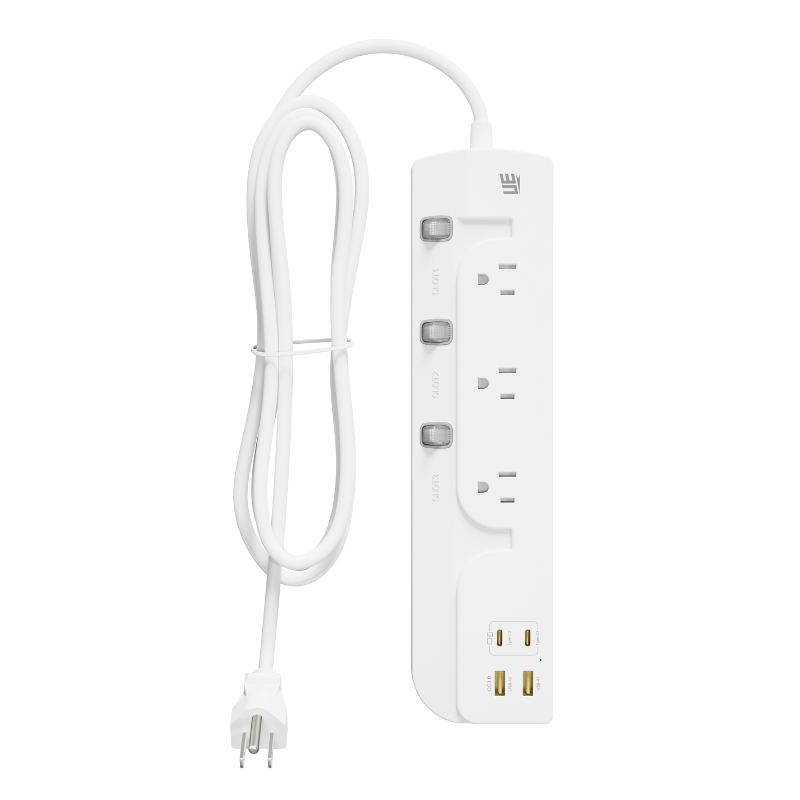
Residential building codes dictate wall outlet placement through the standard NEC 6-foot rule. They ensure minimum room coverage but fail to solve the “last-mile” device density problem. You still need power exactly where you work. Modern workspaces require multiple bulky adapters to run properly. However, a standard Extension Socket often suffers from blocked receptacles due to outdated spacing designs. This creates the infamous “wall wart” dilemma. Proper socket design must balance ergonomic spacing, internal busbar safety, thermal management, and modern power delivery alternatives. In this article, you will discover why legacy spacing fails your everyday needs. We will explore structural solutions like rotated orientations and transformer spacing. Finally, you will learn how adopting new technologies can eliminate plug crowding entirely. You cannot rely on outdated hardware for advanced electronics. Upgrading your power infrastructure protects expensive gear. It also keeps your desk perfectly organized.
Key Takeaways
Standard 39–42mm outlet spacing is insufficient for modern AC adapters and bulky transformer blocks.
Optimal physical design requires a minimum of 50mm (center-to-center) spacing for "transformer-ready" receptacles, often combined with 90-degree rotated orientations.
Widening physical spacing introduces thermal and structural challenges; manufacturers must compensate with thicker copper internals and high-retention plastics.
Transitioning to a GaN Extension Hub reduces the reliance on physical AC spacing by shifting power delivery to built-in, high-wattage USB-C architecture.
The Usability Deficit: Why Standard Extension Socket Spacing Fails
The "wall wart" problem creates immense daily frustration. Legacy power strip designs optimize for standard two-prong or three-prong linear plugs. Today, modern reality looks entirely different. We use oversized AC adapters, smart home hubs, and bulky battery chargers. These devices dominate your physical desk space. You quickly realize standard strips cannot accommodate modern electronics. Engineers built legacy strips for simple lamps and basic appliances. They never anticipated massive laptop charging bricks.
Traditional center-to-center spacing usually hovers around 40mm. This metric causes a massive loss of usable outlets. A single 45W+ adapter easily blocks adjacent slots on both sides. You might buy a six-outlet strip but only successfully use three. This equates to a 30% to 50% loss of usable capacity. You waste physical space and limit your connectivity. When a vital port becomes blocked, productivity immediately halts. Real-world needs heavily outpace traditional standard dimensions.
Inefficiency carries high downstream risks for end users. People often resort to dangerous "daisy-chaining" practices. They plug power strips into other power strips to regain lost outlets. This behavior severely violates standard fire safety protocols. It also actively voids equipment warranties. Overloading a single wall circuit risks severe thermal events. A poorly spaced layout forces unsafe user behaviors. Electrical resistance builds up across multiple connection points. Heat accumulates rapidly within cheap plastic housings. You must prioritize proper spacing to prevent these critical safety hazards.
Structural & Ergonomic Solutions for Optimal Outlet Spacing
Engineers deploy several methods to fix crowded strips. They rethink physical layouts to accommodate bulky plugs safely. We must evaluate these structural innovations carefully.
Wide-Spaced (Transformer-Spaced) Receptacles
Bulky adapters desperately need physical room to breathe. The ideal center-to-center pitch spans 50mm to 55mm. This wider stance allows massive charging blocks to sit side-by-side. Some manufacturers utilize a brilliant "mixed layout" approach. They build three or four standard-spaced outlets grouped tightly together. Then, they place one or two wide-spaced outlets at the far end. This satisfies both standard plugs and large transformers. You get the best of both worlds. Space remains optimized for basic cords. Meanwhile, router power bricks fit perfectly on the end. This prevents adapter collision entirely.
90-Degree Rotated Orientations
Orientation plays a crucial role in spatial management. Look closely at the ground pin placement on conventional strips. Standard strips align the ground pin linearly along the strip. This causes horizontally heavy adapters to overlap adjacent slots. Rotating outlets perpendicular to the strip’s length solves this issue brilliantly. The bulk of the adapter hangs off the outer edge. It leaves neighboring receptacles completely unobstructed. This simple ergonomic rotation maximizes usability. You plug in a wide block, and it does not cover the next hole. It is a highly effective, low-cost engineering adjustment.
Multi-Planar (Tower) Designs
Linear flat strips possess strict physical limitations. To break these limits, engineers design 3D cubes or tower formats. They contrast sharply with traditional flat strips lying on the floor. These multi-planar structures distribute bulky plugs across different physical planes. You plug one adapter into the front face. You plug another directly into the side face. This layout avoids spatial collision entirely. Towers efficiently use vertical space on your desk. They drastically reduce your cable footprint.
Common Layout Benefits
Mixed Spacing: Saves desk space while offering high flexibility.
Multi-Planar Layouts: Uses vertical space to maximize overall outlet density.
The Engineering Trade-offs of Widening Outlet Spacing
Widening physical space is not perfectly simple. It introduces hidden engineering challenges you rarely see. Safety and durability sit at the core of these trade-offs.
Moving outlets further apart requires much longer internal copper strips. Engineers know these vital conductive strips as busbars. They carry electricity from the main cable to each individual receptacle. Increasing their length introduces the dangerous risk of voltage drop. It also significantly increases electrical resistance. If manufacturers use substandard materials, the strip becomes unsafe. They must use thicker, high-purity copper to maintain absolute integrity. Quality busbars prevent heat generation under heavy electrical loads. One-piece copper stamping offers the best internal safety rating.
An elongated plastic housing faces physical vulnerabilities constantly. Overly long strips become susceptible to severe bending. They might crack if someone accidentally steps on them. Dropping them can cause invisible internal disconnects. Engineers must reinforce the outer chassis thoroughly. They use thicker, high-retention polycarbonate plastics to prevent casing flex. A rigid frame protects the delicate copper busbars inside. Without structural rigidity, the device degrades rapidly over time.
Safety certifications actively govern structural dimensions. Reputable manufacturers must limit length and spacing intentionally. They do this to maintain vital UL or CE safety marks. Long busbars generate more heat under prolonged heavy loads. Heat dissipation becomes a major hurdle for product designers. Flame-retardant housing limits also restrict how large a strip can safely become. Sticking to these strict parameters prevents electrical fires in your home. Compliance ensures the product handles rated amperages securely.
Bypassing the Spacing Problem: The GaN Extension Hub
Sometimes, you must rethink the core problem entirely. Upgrading old designs only goes so far.
The ultimate solution to AC plug crowding is radical. You simply remove the need for the bulky AC adapter. Adapters simply convert alternating current to direct current. If the strip does this internally, you regain physical space instantly. The power paradigm shifts from the wall to the device hub. You eliminate the physical transformer blocks from the equation.
This is exactly where modern technology truly shines. A GaN Extension Hub directly integrates high-wattage DC output into the chassis. It offers impressive 65W, 100W, or even 140W USB-C ports. You plug your laptop cable directly into the hub interface. You bypass the bulky manufacturer power brick completely. The physical spacing of AC outlets suddenly matters far less. Your heavy power delivery happens through tiny USB-C cables instead.
Gallium Nitride runs significantly cooler than older silicon components. GaN technology allows for a highly compact form factor. It delivers immense power without triggering overheating thresholds. A single streamlined hub effectively replaces three or four bulky chargers. Your workspace becomes instantly cleaner and more professional. Thermal control remains incredibly stable even under maximum load. It represents the future of desktop power delivery systems.
Extension Socket Spacing and Technology Comparison
Design Type
Typical Spacing (mm)
Ideal Use Case
Main Limitation
Standard Linear
39 - 42
Basic linear 2/3-prong plugs
High outlet blockage rate
Transformer-Spaced
50 - 55
Heavy AV or router adapters
Longer, bulkier footprint
Multi-Planar Tower
Varies (3D)
High-density desk setups
Can be visually obtrusive
GaN Integrated Hub
N/A (Replaces AC)
Modern laptops and phones
Requires USB-C compatible devices
Buyer’s Framework: Shortlisting the Right Extension Socket
Choosing the right unit requires careful technical assessment. You cannot just pick the cheapest option available.
First, audit the specific devices connecting to your target circuit. Assess your load density over total physical volume. Do you currently utilize three or more bulky adapters? If yes, prioritize multi-planar towers immediately. Alternatively, look for linear models explicitly advertising "transformer spacing." Do not just buy a strip containing the most outlets. Buy the strip accommodating your largest individual plugs. Measure your largest adapter width before finalizing any purchase.
Next, evaluate the internal build quality rigorously. Look closely for specifications detailing the internal wiring. A reliable unit uses 14 AWG or lower wire for 15A loads. Seek out one-piece copper sheet designs in the product descriptions. This guarantees the widened spacing does not compromise safety. High-quality internals prevent overheating and dangerous voltage drops. Avoid strips using thin, soldered wires connecting the receptacles. Strong build quality directly equates to long-term electrical safety.
Finally, align the device architecture with your daily usage patterns. Minimalist desk setups benefit heavily from built-in DC ports. Conversely, heavy server racks absolutely require wide-spaced AC blocks. Proper planning prevents future daisy-chaining hazards entirely. Audit your tech ecosystem and identify your heaviest power draws. Match the solution directly to the specific hardware you own.
Conclusion
Effective socket design is not just about making the physical unit longer. It requires highly strategic orientation and robust internal engineering. It also demands smart integration of modern charging protocols. You must constantly balance physical spacing with rigorous electrical safety.
Always audit your plug types before purchasing new power delivery hardware.
For legacy entertainment setups, consistently choose mixed-spacing or multi-planar strips.
For modern workspace environments, transition entirely to integrated GaN hubs.
Always verify internal wire gauge and safety certifications to prevent thermal risks.
Upgrading your power delivery system actively removes dangerous clutter. It effectively protects your expensive devices from electrical surges. Take a brief moment to evaluate your current setup today. A smart upgrade guarantees better productivity and peace of mind.
FAQ
Q: What is the standard distance between outlets on a power strip?
A: Standard center-to-center spacing on most traditional models measures between 39mm and 42mm. This tightly packed layout fits standard two-prong and three-prong plugs perfectly. However, it blocks adjacent slots when using larger adapters. Wide-spaced models expand this distance to 50mm or more to accommodate bulky transformers.
Q: Why aren't all outlets widely spaced on an extension socket?
A: Widening all outlets introduces significant engineering trade-offs. It creates a massive physical footprint taking up too much floor space. It also raises manufacturing costs considerably. Extended internal copper busbars cause potential voltage drops and increased electrical resistance. Manufacturers must carefully balance usable space with structural safety.
Q: Does a GaN extension hub completely eliminate the need for wide-spaced AC outlets?
A: No, it does not completely eliminate the need. A hub handles modern DC devices perfectly, including laptops, tablets, and smartphones. However, wide-spaced AC receptacles remain absolutely necessary for legacy hardware. You still need them to power external hard drives, large monitors, printers, and proprietary smart home routers.
Q: Is it safe to plug multiple large adapters into a single extension socket?
A: Physical fit never guarantees electrical safety. Just because large adapters physically fit does not mean the load remains safe. You must check the total wattage and amperage rating of the entire unit. In the US, most standard household strips max out safely at 1875W or 15A.
UE Electronic is a power supplier integrating R&D, production and sales. We maintain a leading level in extension cord and GaN charger.We are committed to becoming a global power supplier.