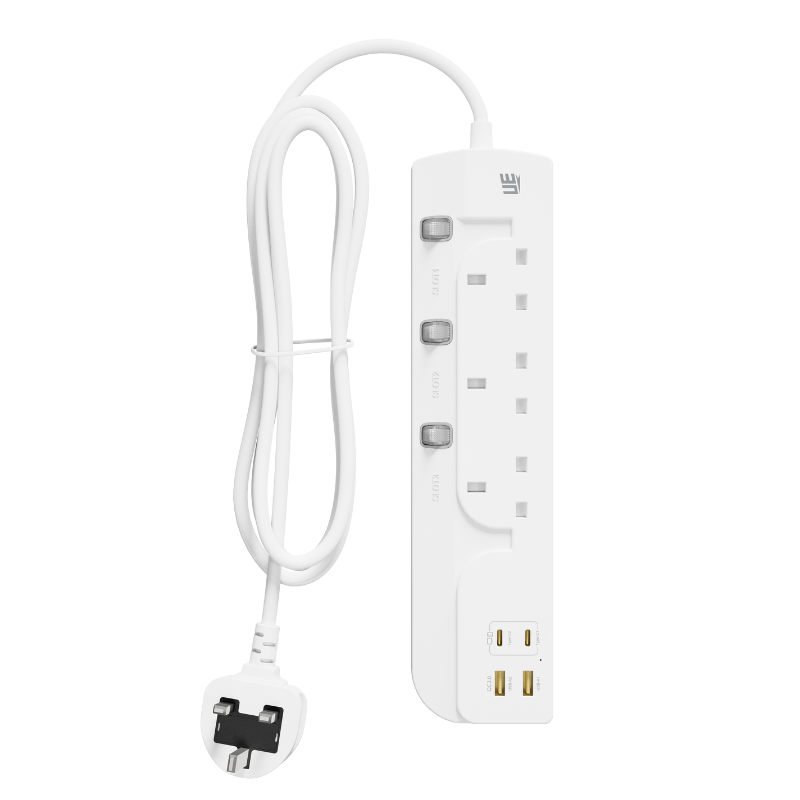
Our reliance on integrated USB power delivery grows every single day. We plug phones, tablets, and laptops directly into wall adapters and power strips. However, this modern convenience carries hidden costs. The internal AC-to-DC conversion process creates vampire draw, often called standby power. It also generates thermal waste, which you feel as physical heat. You might assume warm electronics are perfectly normal. While a slight temperature increase happens under heavy load, excessive heat signals a real problem. A hot power strip often indicates electrical inefficiency. It can also point to material degradation or an undersized power rating for your connected devices. You do not have to accept these hidden penalties. Upgrading to the right hardware eliminates phantom energy waste. Implementing baseline thermal management practices protects your expensive electronics. Following these core steps ensures strict safety compliance and extends the lifespan of your daily devices.
Key Takeaways
Standby power in an extension socket is primarily caused by internal AC-to-DC transformers remaining active; modern smart chips (ICs) mitigate this by cutting power when devices are fully charged.
Excessive heat is a byproduct of high electrical resistance or inefficient power conversion; upgrading to GaN (Gallium Nitride) technology drastically reduces thermal output.
Proper load distribution—especially when utilizing high-output ports like a 65W UK Socket—requires matching device draw with the socket’s certified continuous rating.
Physical placement matters: enclosing a high-wattage extension socket restricts airflow and disables passive cooling, accelerating component wear.
Diagnosing Standby Power and Heat Generation in Your Extension Socket
We must first frame the business and household problem clearly. Phantom load and thermal waste serve as dual symptoms of inefficient power conversion. You will typically find these issues in older or cheaper USB power boards. Phantom load refers to the electricity your devices consume when turned off but still plugged in. Thermal waste is the energy lost as heat during the conversion process. Both issues inflate your electricity usage. They also degrade the internal components of your charging stations over time.
The technical root cause lies within the internal hardware. Standard power grids deliver Alternating Current (AC) at high voltages. Your USB devices require Direct Current (DC) at much lower voltages. To bridge this gap, power boards use internal transformers. In legacy models, these transformers operate continuously. They constantly draw a micro-current to step down the AC mains voltage to DC USB voltage. They perform this action even when you disconnect all your cables. This relentless activity creates a steady phantom load.
Heat serves as your most visible warning sign. You must differentiate between normal operational warmth and dangerous localized heat. When a socket actively charges a device, it will get warm. Operating safely at temperatures up to 40°C or 50°C under load is normal. The casing should feel slightly warm to the touch, not hot. Dangerous heat feels highly localized. If one specific port or plug area feels uncomfortably hot, you have an issue. This localized heat usually stems from loose internal contacts. It can also indicate an overloaded circuit. Loose contacts increase electrical resistance. High resistance forces the current to work harder, which generates rapid, excessive heat. Ignoring this symptom invites catastrophic hardware failure or fire risks.
Hardware Evaluation: Smart ICs and Active Power Management
Solving standby power issues requires evaluating your current hardware. We can divide solutions into two main categories. First, we have legacy "always-on" USB power boards. Second, we have modern variants equipped with Smart ICs (Integrated Circuits). Legacy models lack intelligence. They push power blindly to the ports. Modern variants act like digital traffic controllers. They monitor, adjust, and optimize the electrical flow.
Understanding the feature-to-outcome relationship helps you make better purchasing decisions. Modern Smart ICs offer two critical features:
Auto-Shutoff Mechanisms: These mechanisms act as digital watchdogs. They actively monitor the battery state of your connected devices. When your phone reaches a 100% charge, the socket detects the voltage change. The Smart IC then physically throttles the DC output down to zero. This action completely stops the vampire draw. It also prevents your device battery from overcharging.
Dynamic Power Allocation: You rarely charge just one device at a time. You might plug in a laptop, a tablet, and a pair of earbuds simultaneously. Legacy boards divide power clumsily. Smart ICs evaluate the exact needs of every connected device. They distribute power dynamically. They ensure a heavy-draw laptop gets maximum wattage while preventing low-demand earbuds from receiving dangerous power spikes.
We must acknowledge a transparent assumption regarding this technology. Smart ICs do draw a fractional amount of power themselves. They need this micro-current to monitor the ports and maintain their logic loops. However, the net energy saved is mathematically significant. An active Smart IC consumes mere milliwatts. A legacy transformer bleeding heat consumes exponentially more power over a calendar year. The trade-off overwhelmingly favors the active power management of modern circuits.
Upgrading to a 65W UK Socket: Efficiency and Scalability
Evaluating high-power solutions requires looking beyond basic charging. Standard USB ports typically output 12W or 18W. These ports handle smartphones and small accessories adequately. However, they fail when tasked with charging modern laptops or high-draw peripherals. Transitioning to a dedicated, high-output port transforms your charging experience. When you upgrade to a modern Extension Socket,65W UK Socket, you gain significant thermal advantages and unmatched scalability. You can power demanding devices directly without relying on heavy external adapters.
The secret behind this efficiency is Gallium Nitride, commonly known as GaN. Traditional power conversion relies on silicon components. Silicon has served the industry well, but it has physical limits. It resists electrical flow, generating substantial heat during high-wattage transfers. GaN technology fundamentally changes this dynamic. Gallium Nitride components feature a wider bandgap than silicon. This means they conduct electrons far more efficiently. GaN chips operate at higher voltages and switch frequencies with vastly lower heat signatures. Because they waste less energy as heat, more energy goes directly into your device battery. This keeps the entire power board remarkably cool, even when pushing 65 watts of continuous power.
You will notice immediate consolidation benefits when you adopt this technology. Look under a typical office desk. You usually see multiple bulky wall bricks crowded onto a single power strip. Each brick contains its own internal transformer. Each brick generates its own heat. These overlapping thermal zones compound electrical resistance. Replacing these multiple bricks with a single integrated 65W board solves this problem. You reduce the overall thermal footprint in your room. You minimize localized electrical resistance by eliminating redundant plug connections. This streamlining protects your hardware and declutters your physical space.
Implementation Realities: Optimizing Placement and Load Distribution
Owning high-quality hardware only solves half the problem. You must also address the physical realities of deploying these devices. Residential and office environments present unique adoption risks. Users often prioritize aesthetics over electrical safety. They hide cables and power boards out of sight. This behavior directly undermines passive cooling designs. Even highly efficient GaN hardware requires basic ambient airflow to dissipate residual warmth.
Implementing thermal management best practices guarantees longevity and safety. You must consciously position your hardware to encourage airflow. Follow these crucial guidelines:
Avoid Restrictive Enclosures: Never place your power board under rugs or heavy carpets. Do not bury it behind heavy furniture where air cannot circulate. Avoid stuffing high-wattage boards inside tight cable-management boxes lacking ventilation holes. Enclosing the unit traps heat, disabling passive cooling and accelerating component wear.
Ensure Secure Connections: Physical cable connections must remain tight. Loose USB cables or sagging AC plugs increase contact resistance. Electricity arcs across tiny gaps in loose connections. This arcing generates intense secondary heat, which can quickly melt plastic casings. Inspect your plugs regularly.
Distribute the Load Evenly: Do not plug all your heaviest-drawing devices into adjacent AC outlets on the board. Spread them out to distribute the thermal load evenly across the internal copper busbars.
You must absolutely avoid the severe risks of daisy-chaining. Daisy-chaining involves plugging one power strip into another to extend reach or add ports. This practice compounds electrical resistance dangerously. It drops the voltage while spiking the amperage. This stresses the internal wiring beyond its designed limits. Daisy-chaining instantly invalidates safety ratings and serves as a leading cause of electrical fires in office spaces.
Shortlisting Criteria and Safety Compliance
You need a reliable framework to evaluate potential hardware upgrades. The market floods consumers with cheap, non-compliant power boards. You must filter these out using authoritative standards. Certifications are non-negotiable. If a reliable Extension Socket lacks proper testing marks, do not buy it. In the UK market, BS 1363 compliance is mandatory. This standard ensures shuttered contacts and individually fused plugs. Look for CE markings, which indicate conformity with health and safety standards. Ensure the product complies with RoHS, which restricts hazardous materials. High-quality boards also feature internal thermal fuses. These fuses physically break the circuit if internal temperatures exceed safe limits.
You must also apply material quality lenses during your evaluation. Do not judge a power board merely by its external design. The internal construction dictates its safety profile. Premium boards use heavy-duty, pure copper wiring. Thick copper offers lower resistance, reducing conductive heat under heavy loads. The external casing matters just as much. Demand V0-rated flame-retardant polycarbonate casings. If an internal fault does spark, V0-rated plastic will self-extinguish within 10 seconds. It will not drip flaming material onto your floor.
To simplify your next-step actions, use the buyer evaluation checklist below. This chart highlights the critical features you should verify before deploying new power hardware in your environment.
Safety and Feature Evaluation Checklist
Feature Category
Why It Matters
Ideal Specification
Total Wattage Capacity
Prevents overloading the internal wiring when multiple devices are active.
Check for a minimum combined rating of 2990W to 3250W (Standard 13A load).
GaN & Smart IC Tech
Reduces standby power (phantom load) and prevents extreme thermal waste.
Verify "GaN technology" and "Auto-shutoff / Power Delivery (PD)" on packaging.
Surge Protection
Defends sensitive electronics from sudden grid voltage spikes.
Look for a physical LED indicator confirming active surge protection.
Casing Material
Prevents fires from spreading if a catastrophic short circuit occurs.
Ensures independent testing against rigorous electrical safety laws.
Verify BS 1363 (for UK), CE, and RoHS marks.
Conclusion
Reducing standby power and excessive heat requires a two-pronged approach. You must select highly efficient hardware and practice safe spatial management. Legacy transformers waste energy and generate dangerous thermal footprints. Upgrading to GaN-equipped technology instantly mitigates these issues. Modern smart chips eliminate phantom loads by actively managing the power flow. They protect your device batteries while keeping the ambient temperature of the casing safely regulated.
Take actionable steps today to secure your charging stations. Audit your current power setups at home and in the office. Touch your older boards; if they feel uncomfortably warm without a heavy load, discard them safely. Invest in compliant, high-efficiency power hardware that comfortably matches your peak load requirements. Ensure you place your new boards in well-ventilated areas. Making these simple changes eliminates energy waste, prolongs your hardware investments, and guarantees a safer living environment.
FAQ
Q: Do USB ports on an extension socket draw power when nothing is plugged in?
A: Yes, legacy sockets draw a small "phantom load" to keep the transformer active. However, high-quality modern sockets use smart controllers to reduce this draw to near zero (typically under 0.1W).
Q: Is it safe to plug low-power devices (like earbuds) into a high-power 65W UK Socket?
A: Yes. Modern USB protocols (like USB-PD) require a "handshake" between the device and the socket. The socket will only deliver the wattage the smaller device requests, preventing overheating or battery damage.
Q: Why is my extension socket getting hot even when devices are fully charged?
A: This usually indicates a failure in the socket's internal voltage regulator or a physical flaw causing high electrical resistance. If an extension socket remains hot without an active load, it poses a fire risk and should be replaced immediately.
UE Electronic is a power supplier integrating R&D, production and sales. We maintain a leading level in extension cord and GaN charger.We are committed to becoming a global power supplier.