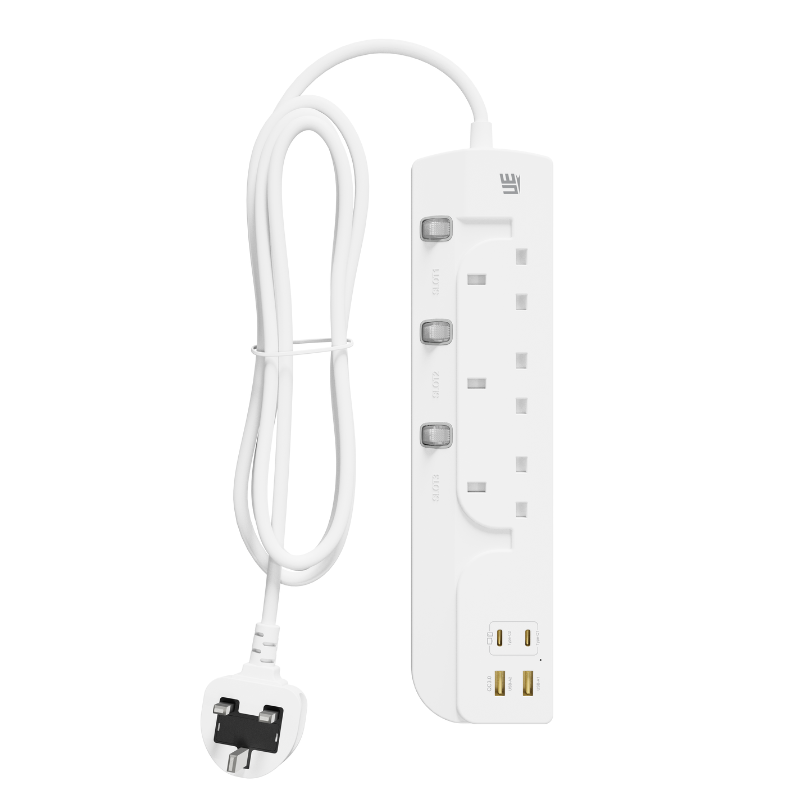
An extension socket is suitable for both home and office use when its outlet configuration, power rating, charging capacity, and safety features match the devices connected to it. In modern spaces, one wall outlet is rarely enough. A typical household may need to power televisions, lamps, routers, computers, kitchen appliances, and mobile chargers, while an office workstation may include a laptop, monitor, printer, phone, headset, and desk accessories.
A well-selected Extension Socketcan bring these power connections together in one accessible location. Models that combine AC outlets with USB-A and USB-C ports are particularly useful because they can support traditional electrical equipment and rechargeable electronics without requiring a separate adapter for every device.
However, suitability depends on more than convenience. Home and office environments have different usage patterns, power demands, and safety concerns. Understanding these differences helps users choose a product that works reliably without creating unnecessary clutter, overload, or heat.
Homes and Offices Now Depend on More Electronic Devices
The number of electronic products used in everyday life has increased steadily. Even a small bedroom may contain a lamp, phone charger, tablet, laptop, smart speaker, fan, and alarm clock. In a living room, users may need power for a television, router, game console, sound system, streaming device, and decorative lighting.
Office desks have changed in a similar way. A single computer is often accompanied by one or two monitors, a docking station, headset, desk lamp, mobile phone, and other rechargeable accessories. Meeting rooms may also require temporary power for laptops, projectors, cameras, and conferencing equipment.
Because wall outlets are usually fixed in number and position, extension sockets provide a practical way to place power where people actually need it. They can reduce the need to move furniture, install additional wall sockets, or use several individual chargers in different areas.
The Goal Is Better Access, Not Unlimited Power
An extension socket increases the number of connection points, but it does not increase the capacity of the building’s electrical circuit. All connected devices still draw power through one wall outlet and one extension cable.
This distinction is important in both homes and offices. A product may have seven or nine connection points, but users must still keep the combined load within its rated limit. The number of available sockets should never be treated as permission to connect any combination of appliances.
Where Extension Sockets Work Well at Home
Home use covers a wide range of situations. In many cases, an extension socket is most useful in areas where several low- or medium-power devices operate together. Entertainment centers, work-from-home desks, bedrooms, study areas, and charging stations are common examples.
Behind a television, one extension socket can supply power to the display, router, game console, speaker, and media player. On a desk, it can support a monitor, laptop adapter, lamp, phone, and headphones. Beside a bed, USB ports can charge mobile devices while AC outlets remain available for a lamp or other equipment.
These applications are generally suitable because the connected products have predictable power requirements and remain in one place. A stable layout also makes cable organization easier.
USB Ports Are Useful in Bedrooms and Study Areas
USB-equipped models are particularly practical in personal spaces. Phones, watches, tablets, e-readers, wireless headphones, and power banks can connect directly through USB-A or USB-C cables.
This reduces the number of individual wall adapters around the room. It can also preserve the AC outlets for equipment that genuinely needs a plug, such as a lamp, computer, monitor, or fan.
Users should still consider indicator lights and switch placement. A bright power light may be distracting in a bedroom, while an easily accessible master switch may be convenient for turning off several devices at once.
Some Household Appliances Need More Care
Not every home appliance is an ideal match for a general extension socket. Products that create heat or draw high power require particular attention. Electric kettles, space heaters, hair dryers, microwave ovens, air fryers, coffee machines, and portable cooking equipment can consume a large amount of electricity.
Connecting several high-power appliances to one extension socket may exceed its maximum load, even if only two or three outlets are occupied. Heat can build up in the cable, plug, switch, or internal contacts, especially during long operating periods.
Manufacturer instructions should always take priority. Some appliances are intended to be connected directly to a wall outlet. If the appliance manual advises against extension use, that guidance should be followed.
Kitchens and Bathrooms Require Additional Caution
Water, steam, grease, and high temperatures make kitchens and bathrooms more demanding electrical environments. A standard indoor extension socket should not be placed where it may be splashed, exposed to condensation, or handled with wet hands.
Products used in these areas should comply with local electrical rules and be positioned away from sinks, showers, cooking surfaces, and other moisture sources. In many situations, professionally installed wall outlets are a safer long-term solution than a loose extension socket.
Office Desks Are One of the Best Applications
Office workstations usually contain several devices with moderate and relatively stable power consumption. This makes them well suited to extension sockets designed for desktop electronics.
A typical arrangement may include a laptop or desktop computer, one or two monitors, a desk lamp, mobile phone charger, headset, and docking station. A socket with both AC and USB connections can support these devices while keeping cables concentrated in one area.
For permanent desks, cable length and mounting options matter. A product placed under the desk may need a secure bracket or mounting holes, while a desktop model should remain stable when plugs are inserted or removed.
USB-C Can Support Modern Work Equipment
Many office devices now use USB-C, including laptops, tablets, phones, cameras, and portable displays. An extension socket with sufficient USB-C Power Delivery output may reduce the need for a separate laptop charger.
Buyers should check the actual output rating rather than assuming that every USB-C port can power a computer. Some ports are designed only for phones and smaller devices. Others may provide higher output when used alone but distribute power differently when several USB ports operate at the same time.
Shared Offices Need Durable and Simple Products
In a private home, the same person often uses the extension socket every day. In a shared office, meeting room, classroom, hotel, or coworking space, many people may connect and disconnect equipment repeatedly.
This increases wear on the outlets, switches, and cable. It also raises the chance of users connecting unsuitable equipment without checking the total load.
For shared environments, durability and clear labeling become especially important. The maximum rating should be easy to find, and the outlet layout should accommodate common laptop adapters without blocking neighboring sockets. A robust housing, firm socket contacts, and reliable cable entry can support longer service life.
Meeting Rooms Benefit From Flexible Connections
Meeting participants may arrive with different devices and charging cables. Some may need a standard AC outlet for a laptop adapter, while others may use USB-C or USB-A.
A mixed-interface extension socket can make the room more adaptable without requiring a collection of loose chargers. It also allows temporary equipment such as projectors, cameras, conferencing systems, and presentation devices to share a central power point.
The socket should be positioned where cables do not cross walkways. Floor placement may create a trip hazard, so table-mounted, recessed, or under-table arrangements can be more suitable for frequently used rooms.
Outlet Layout Can Matter More Than Outlet Count
A high number of outlets may look attractive, but physical spacing determines how many of them can actually be used. Large adapters can cover nearby sockets when outlets are arranged too closely.
For home entertainment systems and office desks, it is useful to identify the largest adapters before choosing a product. Wider spacing, angled outlets, or a three-dimensional layout may provide more usable capacity than a flat strip with tightly packed sockets.
USB ports can also improve effective capacity. When phones and accessories connect directly through USB, AC outlets remain available for monitors, lamps, printers, and other plug-powered equipment.
Cable Length Should Match the Room Layout
A cable that is too short may encourage users to stretch it across furniture or walkways. A cable that is unnecessarily long can create clutter and may be left tightly coiled, which can restrict heat dissipation under heavier loads.
For bedside tables and desks close to the wall, a shorter cable may be sufficient. Meeting rooms, open offices, and larger living areas may require additional reach.
The cable should lie freely without being trapped under chair legs, doors, carpets, or heavy furniture. It should also be protected from repeated bending near the plug and socket housing.
Extension Sockets Should Not Become Permanent Building Wiring
An extension socket is useful for distributing power, but it should not replace proper electrical installation where additional outlets are consistently needed. If a room relies on several linked extension sockets every day, the underlying electrical layout may need professional improvement.
Connecting one extension socket into another can make the total load difficult to monitor. The first unit carries the current of everything connected further down the chain, increasing the risk of overload and heat.
Safety Features Are Important in Both Environments
A suitable extension socket should include protection appropriate to its design and intended market. Common functions may include overload, overcurrent, overvoltage, short-circuit, surge, and overheating protection.
Flame-retardant housing materials, secure grounding, socket shutters, and a properly rated cable also contribute to safer operation. In homes with children, protective shutters may be particularly useful. In offices, surge protection may help protect sensitive electronics from certain short voltage disturbances, although the level of protection should be clearly stated.
Certification requirements differ between markets. UK, EU, US, and other regions use different plug designs, voltage environments, and safety standards. The product should be designed and approved for the country where it will be sold and used.
Visual Checks Should Become a Routine
Users do not need specialized tools to notice early warning signs. Cracked housing, loose outlets, damaged cable insulation, dark marks, unusual odor, buzzing, and excessive heat are reasons to stop using the product.
Office managers may benefit from checking shared extension sockets periodically, especially in meeting rooms and flexible work areas. At home, users should inspect products that are frequently moved, stored, or used with different appliances.
Choosing Between a Basic and Multi-Function Model
A basic model with only AC outlets may be sufficient for televisions, lamps, and desktop equipment that already has its own power adapters. A multi-function model becomes more useful when users regularly charge phones, tablets, headphones, and USB-C devices.
Higher USB output is valuable for laptops and larger mobile devices, while lower-output ports may be adequate for watches, earbuds, and small accessories. GaN-based charging designs can support compact products with higher power conversion capability, but buyers should still compare total output and port-sharing rules.
The best option is not necessarily the product with the greatest number of ports or the highest advertised wattage. It is the one whose configuration matches the devices used in that particular room.
A Practical Choice for Modern Spaces
An extension socket is suitable for home and office use when it is selected according to actual equipment, total power demand, regional standards, cable layout, and operating environment. It works particularly well for entertainment systems, bedrooms, study areas, home offices, commercial workstations, meeting rooms, and shared charging spaces.
Users should be more cautious with high-power appliances, wet locations, tightly enclosed spaces, and linked extension arrangements. Proper placement, moderate loading, firm plug connections, and regular inspection all help maintain reliable performance.
For brands, distributors, and commercial buyers seeking home and office power solutions, UE Electronic supports the development and manufacturing of products with regional AC outlets, USB-A and USB-C charging, GaN power technology, customized interface layouts, safety protection, testing, labeling, and packaging options. By matching each design to its intended devices and usage environment, UE Electronic helps customers create practical power products for modern residential and workplace applications.
UE Electronic is a power supplier integrating R&D, production and sales. We maintain a leading level in extension cord and GaN charger.We are committed to becoming a global power supplier.