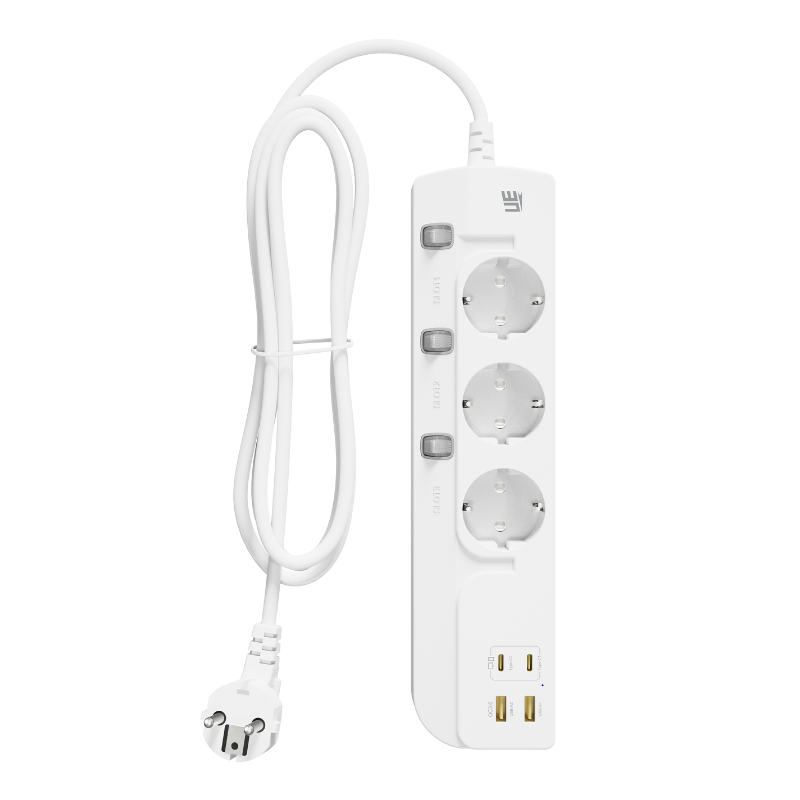
An extension socket can stop working suddenly, work only on some outlets, or repeatedly cut off whenever several devices are connected. In many cases, the cause is relatively simple, such as an overloaded circuit, a loose wall connection, or a protection switch that has been triggered. In other situations, the problem may involve a damaged cable, worn internal contacts, overheating, or failure in the USB charging module.
Because an Extension Sockethandles mains electricity, it should never be treated like an ordinary low-voltage accessory. Basic external checks are reasonable, but users should not open the housing or attempt internal repairs unless they are properly qualified. Understanding the most common failure causes can help users decide whether the socket can be reset, whether another device is responsible, or whether the product should be replaced.
First Confirm That the Wall Outlet Has Power
When an extension socket appears completely dead, the extension socket itself is not always the cause. The wall outlet may have lost power because a circuit breaker has tripped, a wall switch has been turned off, or a local electrical circuit has developed a fault.
Before assuming that the extension socket has failed, unplug it and test the wall outlet with another device that is known to work. A small lamp or charger can help confirm whether power is available. Users should avoid testing with damaged equipment or high-power appliances.
If the second device also does not work, the issue is probably related to the wall outlet or building circuit rather than the extension socket. In this case, the household breaker panel may need to be checked. Any repeated tripping, burning smell, unusual noise, or visible damage around the wall socket should be handled by a qualified electrician.
A Switched Wall Socket May Be Turned Off
In some countries, wall outlets include individual switches. It is easy for one of these switches to be turned off accidentally during cleaning, furniture movement, or cable rearrangement. Some outlets may also be controlled by a separate wall switch elsewhere in the room.
This is a simple detail, but it is worth checking before replacing the extension socket. The same applies to extension sockets with a master power switch. A switch may have been pressed unintentionally, or it may not have been fully moved into the operating position.
Overload Protection May Have Interrupted the Power
One of the most common reasons an extension socket stops working is electrical overload. Every extension socket has a maximum rated voltage, current, and total power. When connected devices demand more than the safe limit, an overload protection mechanism may disconnect the supply.
This often happens when several high-power appliances are used at the same time. Electric heaters, kettles, coffee machines, hair dryers, microwave ovens, and cooking equipment consume much more power than phone chargers, lamps, or laptop adapters.
For example, an extension socket may operate normally with a computer and monitor but cut off when a heater is added. The problem is not necessarily the number of connected devices. It is the combined power consumption of those devices.
How to Respond After an Overload Cutoff
Disconnect all equipment and unplug the extension socket from the wall. Allow it to cool before checking whether the product includes a resettable overload switch or circuit breaker. The exact reset procedure should be explained in the product manual.
After resetting, reconnect only low-power devices and observe whether normal operation returns. Do not immediately reconnect the same heavy load. If the extension socket trips again under a modest load, it may have an internal fault and should be removed from service.
Users should also avoid repeatedly resetting an extension socket without identifying the cause. The protection system is responding to a condition that may be unsafe. Treating the cutoff as an inconvenience rather than a warning can lead to overheating or equipment damage.
A Damaged Power Cable Can Break the Electrical Connection
The cable is exposed to bending, pulling, twisting, furniture pressure, and frequent movement. Over time, the internal conductors may become damaged even when the outer insulation still appears mostly intact.
Cable damage commonly occurs near the plug, close to the socket housing, or at points where the cable is repeatedly bent. A product may work when the cable is held in one position and stop when it moves. This intermittent behavior strongly suggests a connection problem.
A cable with cuts, flattened areas, exposed conductors, melted insulation, or severe twisting should not be used. Wrapping damaged mains cable with ordinary tape is not a suitable long-term repair. The safest response is usually to replace the extension socket.
Pulling the Cable Can Loosen Internal Connections
Users should disconnect an extension socket by holding the plug rather than pulling the cable. Repeatedly pulling from a distance places stress on the connection between the cable and plug terminals. It can also weaken the cable entry point at the extension socket housing.
A strain-relief structure is designed to reduce this stress, but it cannot prevent damage caused by rough handling indefinitely. Commercial spaces, shared offices, classrooms, and hospitality environments may experience faster cable wear because many different people handle the product.
The Main Switch or Protection Button May Be Worn
Many extension sockets use a master switch to control all AC outlets and USB charging ports. Mechanical switches have moving contacts that can wear after repeated operation. Dust, heat, electrical arcing, or manufacturing defects may also affect switch performance.
A worn switch may feel loose, fail to remain in position, or provide power only when pressed at a certain angle. An indicator light may flicker even though connected devices do not receive stable power.
If the switch behaves unusually, users should not hold it in place with tape or objects. A failing power switch can create an unstable electrical connection and additional heat. Replacement is generally safer than attempting to continue using the unit.
Internal Socket Contacts Can Become Loose or Worn
Each AC outlet contains conductive contacts that grip the pins of a connected plug. These contacts must provide firm mechanical pressure and a stable electrical connection. After repeated plug insertion, especially with damaged or poorly sized plugs, the contacts may gradually lose tension.
A loose outlet may fail to power a device, work only when the plug is moved, or allow the plug to fall out easily. Weak contact can also increase electrical resistance, which creates heat at the connection point.
If one outlet stops working while the others remain normal, local contact wear or an internal wiring issue may be responsible. The affected outlet should not be used. Even when the other outlets still function, continuing to operate a partially damaged extension socket may not be advisable because the internal condition cannot be verified externally.
Discoloration Around an Outlet Is a Warning
Brown marks, darkened plastic, deformation, or a burnt smell around an outlet can indicate overheating or electrical arcing. These signs require immediate attention. Unplug the extension socket after switching off the power where practical, and do not reconnect it.
Visible heat damage is not a cosmetic issue. It may mean that the contact structure, conductor, or surrounding insulation has already deteriorated. Replacing the unit is safer than testing whether it still works.
Heat Buildup Can Trigger Automatic Shutdown
Modern extension sockets with USB-A, USB-C, fast charging, or GaN power conversion contain electronic components that generate heat during normal operation. A properly designed product manages this heat through component selection, internal spacing, housing materials, and temperature protection.
Problems can occur when the extension socket is covered by bedding, placed under a carpet, trapped behind furniture, or used in a poorly ventilated enclosure. Heat can also increase when several USB ports and AC outlets operate near their maximum combined output.
Some products include thermal protection that reduces charging power or shuts the unit down when internal temperature rises beyond a safe level. After cooling, the product may operate again. However, frequent heat-related shutdowns indicate that the operating conditions or connected load need to be changed.
High Room Temperature Can Make the Problem Worse
An extension socket used near a radiator, direct sunlight, cooking equipment, or other heat source has less ability to release internally generated heat. Warm environments may also reduce the safe operating margin of electronic components.
The product should be placed on a stable, open surface with reasonable airflow. It should not be stacked with chargers or surrounded by objects that trap heat. If the housing becomes unusually hot during ordinary use, disconnect it and review the connected load and product instructions.
The USB Ports May Fail While the AC Outlets Still Work
An extension socket that combines AC outlets and USB charging contains separate electrical sections. The AC outlets distribute mains power, while the USB module converts that power into low-voltage DC output. This means one section can fail while the other continues operating.
If the AC outlets work but the USB ports do not, the issue may involve the charging cable, the connected device, power negotiation, shared output limits, or the internal USB power module. Testing with another cable and compatible device can help identify whether the problem is external.
Some USB-C devices require particular charging protocols or minimum output levels. A device that does not charge is not always evidence that the port is broken. The extension socket specifications should be checked to confirm supported USB standards and output combinations.
Shared USB Power Can Change Charging Performance
Multi-port products often divide their total USB power among connected devices. A USB-C port may provide its highest output when used alone but offer less power when several ports are active. A laptop may stop charging or display a slow-charging warning after another device is connected.
This is different from a complete port failure. Disconnecting other USB devices may restore the expected output. Clear power-distribution information helps users understand which port combinations are suitable for phones, tablets, laptops, and smaller accessories.
A Connected Device May Be Causing the Problem
Sometimes an extension socket stops working only when a particular appliance is connected. The appliance may have a short circuit, damaged cable, faulty adapter, or unusually high starting current. The extension socket’s protection system may cut power to prevent a more serious problem.
Disconnect all devices and reconnect them individually. If the extension socket consistently trips when the same product is added, stop using that device until it has been inspected. Do not keep testing it through different extension sockets, as the fault may damage other equipment or trip the building circuit.
Chargers should also be checked. A damaged phone or laptop adapter can create heat, noise, sparks, or unstable power demand. Replacing the extension socket will not solve a problem caused by faulty connected equipment.
Moisture, Dust, and Contamination Can Affect Performance
Most standard extension sockets are intended for dry indoor environments. Water, high humidity, conductive dust, metal particles, and spilled liquids can interfere with electrical insulation and internal contacts.
If liquid enters the product, it should be disconnected immediately without touching wet surfaces. It should not be switched back on simply because the outside appears dry. Moisture may remain inside the housing and create a shock or short-circuit risk.
Workshops, factories, outdoor areas, kitchens, and construction sites may require products with specific environmental protection. A general household extension socket should not be used as a substitute for industrial or weather-resistant electrical equipment.
Component Aging Can Eventually End the Product’s Service Life
Like other electrical products, extension sockets do not last forever. Switches, socket contacts, protection components, USB power circuits, cable insulation, and internal connections experience wear over time.
Service life depends on product quality, electrical load, operating temperature, usage frequency, storage conditions, and handling. A lightly used socket in a home office may last considerably longer than one that is frequently moved and heavily loaded in a shared commercial environment.
There is no single replacement period that applies to every extension socket. Regular visual checks are more useful than relying only on age. Products showing cracks, loose sockets, damaged cables, intermittent operation, overheating, buzzing, or burning odors should be replaced promptly.
When Should You Stop Troubleshooting?
Basic checks can include confirming wall power, verifying the master switch, disconnecting excessive loads, trying another charging cable, and following the manufacturer’s reset instructions. Troubleshooting should stop when there is visible damage, melted plastic, exposed wiring, repeated tripping, smoke, sparks, unusual noise, or a burning smell.
Users should not open the housing to inspect internal parts. Extension sockets may contain mains-voltage components and capacitors that present a hazard even after the product has been unplugged. Internal repairs should only be performed by qualified personnel when the product is designed to be serviced.
For ordinary consumer models, replacement is often more practical and safer than repair. Choosing a correctly rated product and using it within the specified conditions can help prevent the same problem from happening again.
Reliable Operation Begins With Suitable Product Design
An extension socket may stop working because of an external power issue, excessive load, cable damage, worn contacts, overheating, USB module failure, environmental exposure, or natural component aging. The correct response depends on the symptoms, but safety should always take priority over restoring power quickly.
For brands and distributors developing extension socket products for home, office, travel, and commercial applications, UE Electronicsupports product design and manufacturing across regional plug standards, AC outlet layouts, USB-A and USB-C charging configurations, GaN power solutions, protective functions, testing, labeling, and customized packaging. Matching the internal design and rated output to the intended usage environment helps produce extension sockets that deliver more stable operation throughout their service life.
UE Electronic is a power supplier integrating R&D, production and sales. We maintain a leading level in extension cord and GaN charger.We are committed to becoming a global power supplier.